Spec Battle: Aura vs Adata Sd810 External Ssd — Is It Worth Upgrading?
External SSDs have become a standard tool for creative professionals, travelers, and power users who need fast, portable storage. Two names that often appear in discussions are ADATA’s SD810 and the various Aura drives from OWC (commonly referred to as the Aura family). This article compares the two in practical terms—interface, performance, durability, encryption, and real-world use cases—so buyers can decide whether an upgrade is warranted.
Introduction: Who this comparison is for
This comparison is aimed at users who already own an external SSD or are deciding between buying a rugged, plug‑and‑play unit (like the ADATA SD810) and a high‑performance NVMe-based solution from the Aura family (often used internally or placed into high‑speed enclosures). It will help photographers, video editors, content creators, gamers, and road-warrior professionals answer a core question: does the extra cost and complexity of an Aura-style NVMe solution translate into real-world benefits over the SD810?
Product overviews
ADATA SD810
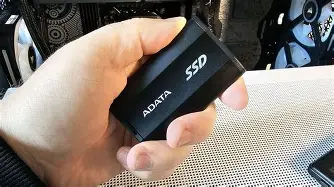
The ADATA SD810 is a purpose-built portable SSD that emphasizes a balance of speed and ruggedness. It is marketed as a USB 3.2 Gen 2x2 device with sequential read/write figures advertised around 2,000 MB/s depending on host support. The SD810 is available in multiple capacities (typically 500 GB to 4 TB), and it carries IP68 dust/water resistance as well as MIL‑STD‑810G shock/drop resistance. The drive targets on‑the‑go users who need fast transfers and a durable enclosure without fussing over an external NVMe enclosure.
OWC Aura (the Aura family)
“Aura” refers to a family of OWC SSDs—models such as the Aura Ultra III, Aura Pro X2, and Aura Pro NT—designed primarily for high-performance storage needs and especially popular among Mac users and professionals. These drives are M.2 NVMe devices whose maximum speeds depend on the specific Aura model and the host interface. Some Aura drives advertise sequential speeds in the 3,000–3,400 MB/s range (typical for NVMe PCIe x4). Important distinctions: many Aura drives are sold as internal/upgrades, and when used externally they require a suitable USB/Thunderbolt enclosure. Aura models vary on encryption support (the Pro NT supports TCG Opal hardware encryption) and generally carry multi‑year warranties.
Detailed analysis: interface, performance, and compatibility
Interface and real-world throughput
ADATA SD810: The SD810 leverages USB 3.2 Gen 2x2 (20 Gbps) with USB-C connectivity. When connected to a host with a Gen 2x2 port, the drive can approach the manufacturer’s advertised ~2,000 MB/s sequential speeds. On older USB ports (Gen 2 or Gen 1), speeds drop accordingly. The SD810 aims to be plug‑and‑play across Windows, macOS, Linux, game consoles, and mobile devices.
OWC Aura: Aura drives are NVMe M.2 devices. As internal drives they connect via PCIe x4 and can reach ~3,000+ MB/s on compatible controllers. External performance depends on the chosen external enclosure or adapter: a Thunderbolt 3/4 enclosure will allow full NVMe speeds (3,000+ MB/s); a USB 3.2 Gen 2 (10 Gbps) enclosure will cap you around ~900–1,000 MB/s; USB 3.2 Gen 2x2 enclosures can allow ~2,000 MB/s if the enclosure and host support it. In short, the Aura family has higher performance potential, but unlocking it requires the correct host and enclosure.
Thermals and sustained performance
Sustained transfers—like copying many multi-gigabyte video clips—stress both drives differently. The SD810’s metal or ruggedized housing is engineered to dissipate heat for moderate sustained workloads; thermally induced throttling is still possible under very long transfers, but the drive is designed with daily portability in mind.
Aura NVMe drives, when placed in a high-speed external enclosure, can produce more heat due to higher throughput. A well-built Thunderbolt enclosure with active or large passive cooling will maintain sustained speeds better. Users who do long form video offload should consider the enclosure’s thermal design as critically as the drive itself.
Discover deals on Laptops & Computers — updated daily.
View Offers →Compatibility and ease of use
The SD810 is explicitly plug‑and‑play. It typically ships preformatted for exFAT, making it usable with macOS and Windows without reformatting. By contrast, Aura drives may require reformatting when used externally depending on the host OS and whether the user wants APFS, HFS+, NTFS, or exFAT. The Aura route may also require purchasing a high‑quality enclosure or docking solution—an extra step and cost compared with a dedicated external SSD.
Durability, security, and warranty
Durability: The SD810 stands out in this category thanks to an IP68 rating (dust tight and water resistant to submersion at specified depths/times when protected) and MIL‑STD‑810G shock compliance—attributes valued by outdoor photographers, field technicians, and travelers.
Aura drives: As internal NVMe modules, Aura drives generally lack IP ratings on their own. Ruggedness then becomes a function of the enclosure used. For users who need rated water/dust resistance, the Aura option requires selecting an IP‑rated, rugged NVMe enclosure to match the SD810’s physical protection.
Encryption and data security: The SD810 does not typically advertise hardware-based encryption. Users who require on‑device encryption will need to rely on host OS encryption tools (BitLocker, FileVault) or third‑party software. In contrast, some Aura models (notably Pro NT) support TCG Opal hardware encryption, making them attractive to security-conscious buyers who want hardware-level protection—again, this assumes the user configures it and uses an enclosure that passes necessary security commands.
Warranty: Both product lines commonly carry multi‑year warranties (Aura models frequently come with a 5‑year warranty; ADATA’s SD810 is typically backed by a multi‑year limited warranty as well). Warranty terms vary by capacity and market—check the official policy for the region when buying.
Pros & cons
ADATA SD810
- Pros: Rugged IP68/MIL‑STD ratings; native USB plug‑and‑play; very good advertised speeds for a portable USB drive (~2,000 MB/s on Gen 2x2 hosts); available in high capacities up to multiple terabytes; no enclosure fuss.
- Cons: Limited headroom for future speed upgrades beyond USB 3.2 Gen 2x2; no widely advertised hardware encryption; sustained extreme workloads may still see thermal throttling common to compact portable drives.
OWC Aura (representative of Ultra III / Pro X2 / Pro NT)
- Pros: Higher peak performance potential (3,000+ MB/s on PCIe x4/Thunderbolt); some models support hardware encryption (TCG Opal); excellent for professional workflows when paired with a Thunderbolt enclosure; often available in large capacities and targeted at pro Mac workflows.
- Cons: Usually sold as internal NVMe modules—requires buying a compatible external enclosure for portable use; no built-in IP rating unless a rugged enclosure is used; total cost (drive + enclosure) can exceed purpose-built externals.
Feature comparison table
| Feature | ADATA SD810 | OWC Aura (representative) |
|---|---|---|
| Interface | USB 3.2 Gen 2x2 (USB‑C) | M.2 NVMe (PCIe x4). External performance depends on enclosure (Thunderbolt/USB) |
| Advertised sequential speed | Up to ~2,000 MB/s (on Gen 2x2 hosts) | Up to ~3,000–3,400 MB/s (internal PCIe; external varies by enclosure) |
| Typical capacities | 500 GB – 4 TB | Several models up to 4 TB (model-dependent) |
| Durability / IP rating | IP68 water/dust, MIL‑STD‑810G shock/drop | No IP rating by default (dependent on chosen enclosure) |
| Encryption | Not generally hardware‑encrypted (use OS encryption) | Some models (e.g., Pro NT) support TCG Opal hardware encryption |
| Warranty | Multi‑year limited warranty (check region) | Typically 5‑year limited warranty (model-dependent) |
| Ease of use | Plug & play; preformatted for broad compatibility | May require enclosure and reformatting; more setup required |
| Best for | Travel, fieldwork, casual to pro users wanting rugged portability | Professionals who need maximum NVMe performance or hardware encryption |
Real-world use cases and what buyers typically care about
Different buyers prioritize different things. Here are common scenarios and what makes more sense in each one.
Photographers and videographers on the move
They often need high durability and quick offloads. The SD810’s IP68 rating and plug‑and‑play convenience are strong advantages. For productions requiring very fast transfers of multi‑hour 4K/ProRes footage, an Aura NVMe in a Thunderbolt enclosure provides faster sustained throughput—but it adds cost, bulk, and a need for careful thermal management.
Shop the latest Laptops & Computers picks on Amazon.
Shop Amazon →Content creators and editors
If the workflow is primarily editing from external media, the extra throughput of an Aura‑class NVMe solution (especially on Thunderbolt) reduces timeline lag and renders faster. If working mostly in proxy workflows or moving smaller projects, the SD810’s performance is typically sufficient.
Gamers and console use
Gamers who use external SSDs for fast load times will benefit from the SD810’s simplicity and compatibility (plug‑and‑play on many consoles). Aura NVMe drives can be used with consoles only if the enclosure and console firmware support them—an often trickier path.
Security‑sensitive business users
For organizations concerned with hardware encryption and drive-level security, certain Aura models that support TCG Opal are attractive. The SD810 requires host-side encryption tools, which can be perfectly secure but may not meet some compliance regimes that expect hardware encryption.
Buying guide: how to choose and when to upgrade
To make an informed decision, ask the following questions:
- What interface and ports are available? If the laptop or desktop has Thunderbolt 3/4, an NVMe‑based Aura in a Thunderbolt enclosure will deliver the best performance. If the host only has USB‑A or USB‑C ports without Gen 2x2/TB, the SD810 is simpler to use and may be faster in practice.
- Do you need rated ruggedness? For fieldwork with exposure to dust or water, the SD810’s IP68 rating is a clear advantage. To match that with an Aura drive you’ll need an IP‑rated, rugged enclosure.
- Do you require hardware encryption? If yes, prioritize Aura models that explicitly advertise TCG Opal support; otherwise, plan to use BitLocker or FileVault with the SD810.
- How important are sustained transfer speeds? For long multi‑GB transfers (large video projects, disk cloning), NVMe in a Thunderbolt enclosure (Aura) will be noticeably faster. For quick backups, media offloads, and general portability, the SD810 is often adequate.
- What is the total cost of ownership? Factor in the cost of an enclosure when considering Aura. A cheap USB enclosure will bottleneck NVMe speeds; an enclosure that preserves NVMe performance (Thunderbolt or Gen 2x2) can be as costly as the drive itself.
- Is cross-platform plug‑and‑play required? If the drive needs to move across many operating systems and devices regularly, a dedicated external like the SD810 minimizes compatibility friction.
Upgrade scenarios
- When to upgrade from SD810 to Aura: Users who routinely edit high‑bitrate video directly from external storage, or those who need hardware encryption at the drive level, will see tangible benefits from moving to an Aura NVMe + high‑speed enclosure.
- When to stick with SD810: Users who prioritize ruggedness, minimal setup, or who primarily offload photos and documents will find the SD810’s combination of speed, durability, and ease superior for day‑to‑day use.
- Hybrid approach: Some professionals keep both: a portable rugged drive for field capture (SD810) and a high‑performance NVMe solution (Aura + enclosure) for editing and long-term workstation work.
Practical purchasing and setup tips
- Verify the host port capability before assuming top speeds—advertised speeds are conditional on matching host interfaces.
- If choosing an Aura NVMe, budget for a quality enclosure with proper thermal characteristics; look for brands that specify NVMe/TB support and thermal dissipation.
- Consider file system and encryption format in advance: exFAT for cross‑platform compatibility, APFS for macOS performance and native encryption, NTFS with BitLocker for Windows-centered workflows.
- Check warranty specifics and RMA procedures in your region—warranty service and support quality vary across manufacturers.
- Keep backups. Regardless of drive selection, use a 3‑2‑1 backup strategy: at least three copies, on two different media types, with one offsite copy.
Conclusion
Both the ADATA SD810 and the OWC Aura family have compelling use cases. The SD810 is a polished, rugged, plug‑and‑play external SSD that appeals to travelers, field shooters, and anyone who wants a straightforward, durable portable drive with very good speeds for its class. Aura drives offer higher peak performance and advanced features like optional hardware encryption, but they are best utilized by users willing to invest in the right enclosure and who need sustained NVMe throughput.
For most users who value convenience and rugged portability, the SD810 is a strong choice and usually does not necessitate an immediate upgrade. Professionals who demand the absolute maximum transfer rates for editing and rendering workflows—or who require hardware encryption at the drive level—will find the Aura path worthwhile, provided they accept the extra cost and setup complexity. Ultimately, the decision comes down to interface compatibility, the nature of typical workloads, and how much value a buyer places on rugged convenience versus peak NVMe performance.